

Candy cane AI photo template
Red-and-white striped sweaters, a snowy forest of giant peppermint candy canes and soft pink light. Upload your photo and get the candy cane portrait everyone posted last December.
Red-and-white striped sweaters in a snowy forest of giant peppermint candy canes. The candy cane AI Christmas photo was the big trend of Christmas 2025.
Takes 1 to 4 photos of adults, pets welcome
Opens the AI Christmas photo generator with this template. Adults and pets only.
Or write your own prompt (advanced)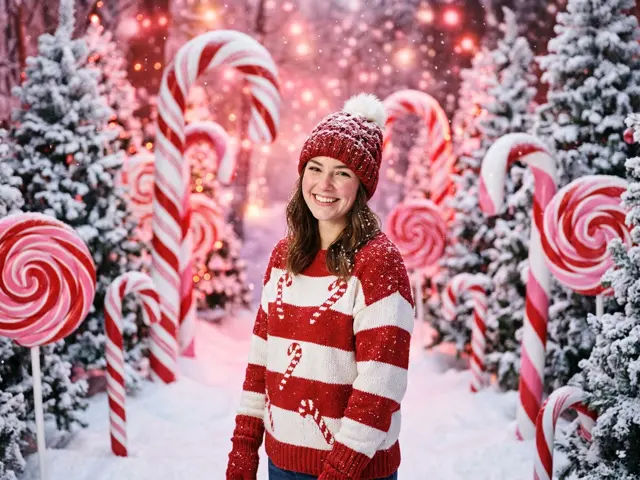 Sample

What the candy cane AI photo looks like
Everyone in your photo comes back in a red-and-white candy-cane striped knit sweater and a matching beanie. Behind you there is a snowy forest where the trees are giant peppermint candy canes and swirl lollipops. The light is soft pink and red, a little glossy, a little playful.
Faces, hair and skin tones stay your own. Only the clothes and the place change, so the candy cane AI photo still looks like you and not like a stranger in a costume.
Why the candy cane trend took off
In December 2025 the candy cane portrait was the Christmas AI photo people kept sharing. It has strong colours that stand out in a feed, it works for one person or a group, and it does not need a real snowy forest.
Most people made theirs by pasting a long prompt into a chatbot and trying again until the stripes and the faces came out right. Here the prompt is built in. You pick the template and upload a photo.
Who it works for
The template takes one to four photos, so it suits a solo profile picture, a couple or a small group of friends. Pets can join too: a dog in a striped sweater among the candy canes is one of the better results.
Solo portrait
One clear selfie gives a candy cane profile picture. Choose 4:5 or 1:1 for Instagram.
Couple or friends
Upload a separate photo of each adult. Everyone ends up in the same striped sweater, side by side.
Christmas card cover
Pick 16:9 for a wide card or email header, then add your message with the Christmas card maker.
Make the candy cane photo look its best
The stripes are loud, so the rest of the picture works best when it stays simple. A plain, well-lit selfie gives the AI the most room to dress you.
If several people are in it, use photos taken in similar light. Mixing a dark indoor shot with a bright outdoor one can make one face look pasted in.
How to make the candy cane AI photo
Three steps, about a minute. Nothing is charged until every photo has passed the safety check.
1. Press “Make the same”
The AI Christmas photo generator opens with the Candy cane portrait template already selected.
2. Upload your photo
One to four photos, one adult or pet per photo. Photos of children are refused before anything is charged.
3. Pick a shape and download
1:1 or 4:5 for a post or profile picture, 9:16 for a story, 16:9 for a banner. Failed renders are refunded automatically.
More AI Christmas photo templates
Every template works the same way: pick it, upload your photo, download the picture. See all AI Christmas photo ideas

Candy cane AI photo FAQ
Can I change the colours from red to green?
The template keeps the classic red-and-white stripes. For other colours, describe the scene in the custom prompt.
What shape should I pick for a profile picture?
Pick 1:1 or 4:5. Both keep your face in the middle so a round crop does not cut it off.
Is the candy cane AI photo the same as the 2025 trend?
It follows the same look: striped sweaters, giant peppermint candy canes and pink light. The exact picture is new each time, made from your own photo.
Can I add more than one person?
Yes. Upload up to four photos, one adult per photo. The AI puts everyone together in the candy cane forest.
Can I use a photo of my dog?
Yes. Adults and pets can be mixed in the same picture. Photos of children are refused before anything is charged.
Do I have to write a prompt?
No. The prompt behind the candy cane template is ours. You only choose a shape and upload your photo.