

AI snow globe photo: your mini-me in the glass
You, or your pet, as a small detailed figurine standing in a snowy village inside a glass snow globe. It is the AI figurine trend of 2025 with a Christmas twist, and it takes one photo.
You, or your pet, as a tiny figurine inside a glass snow globe. It is the 2025 AI figurine trend, done for Christmas. Takes one photo.
Takes one photo of an adult or a pet
Opens the AI Christmas photo generator with this template. Adults and pets only.
Or write your own prompt (advanced)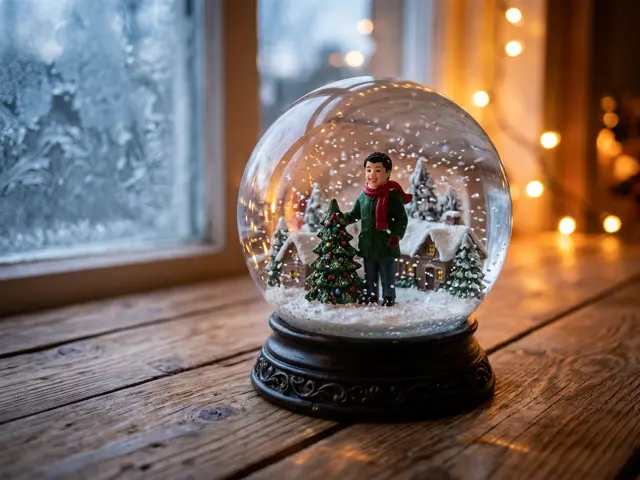 Sample
What you get
The picture looks like a product photo of a real snow globe. It sits on a wooden table by a frosty window with warm Christmas lights behind it. Inside the glass stands a little figurine of you or your pet in a red scarf, next to a tiny Christmas tree, with snowflakes floating around it.
The figurine keeps your face, hair and build, or your pet’s fur and markings, so friends recognise who is in the globe at a glance.
From AI figurines to snow globes
In 2025 people turned themselves into collectible toys with AI: boxed action figures, desk figurines, mini statues. The snow globe is the Christmas version of that idea. A figurine is already a keepsake, and a snow globe is the most Christmas keepsake there is.
Getting a good snow globe photo
This template takes exactly one photo, of one person or one pet. That keeps the figurine sharp.
Full face, plain background
A front-facing photo with nothing busy behind you gives the cleanest figurine.
Pets: eye level
Crouch down so the whole face is in frame. Cats and dogs both work well.
Square for a post
Pick 1:1 or 4:5. The globe sits in the middle of the frame either way.
What to do with your snow globe picture
A snow globe photo is small and cute, which makes it easy to reuse.
Christmas card cover
Put the globe on the front of a card and write the message inside with the card maker.
Gift tag or label
Print it small and stick it on a present for the person in the globe.
Pet keepsake
A snow globe of your dog or cat makes a sweet post for their first Christmas with you.
How to make the AI snow globe photo
Three steps, about a minute. Nothing is charged until every photo has passed the safety check.
1. Press “Make the same”
The AI Christmas photo generator opens with the Snow globe mini-me template already selected.
2. Upload your photo
One clear, front-facing photo. Photos of children are refused before anything is charged.
3. Pick a shape and download
1:1 or 4:5 for a post or profile picture, 9:16 for a story, 16:9 for a banner. Failed renders are refunded automatically.
More AI Christmas photo templates
Every template works the same way: pick it, upload your photo, download the picture. See all AI Christmas photo ideas
AI snow globe photo FAQ
Can I write a name on the snow globe?
No. The templates never add text, so names and words do not appear in the picture. Add them later in the card maker if you want.
Why does it take only one photo?
A figurine is small, so one face keeps it sharp. Two people inside one small globe would lose detail.
Can I put two people in one snow globe?
Not with this template; it takes one photo so the figurine stays detailed. For a couple, try the Polaroid with Santa or the snowy village template.
Does the AI snow globe photo work with pets?
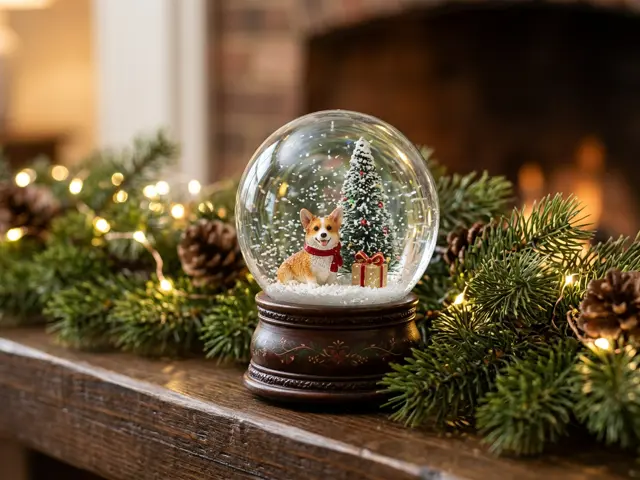
Yes. Upload one clear photo of your dog, cat or other pet and it becomes the figurine inside the globe.
Is it a real 3D model?
No. It is a still image that looks like a photo of a snow globe. You download it as a picture.
How long does it take?
About a minute. If the render fails, the credits go back to your balance automatically.