

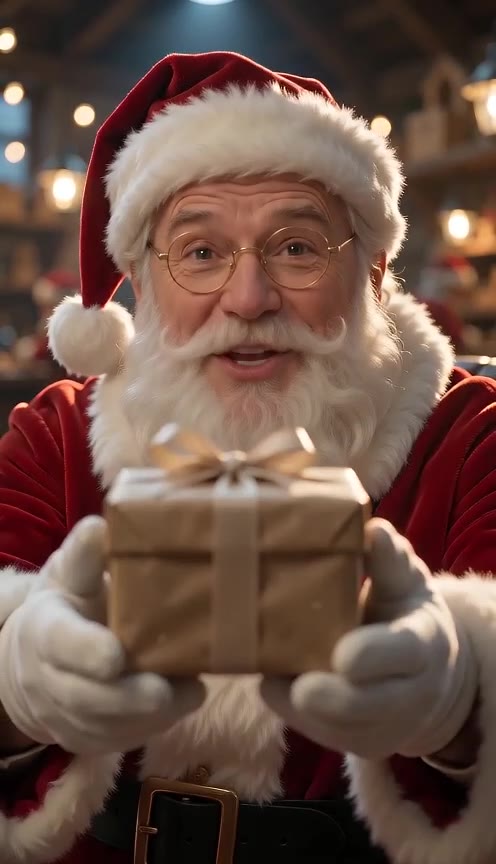
 Made with AI Greeting Video
AI Santa Video: a personalized video from Santa that says your child's name
Type a first name, pick a message and a North Pole scene, and Santa says it to the camera: the Nice List, “I got your letter”, Christmas Eve or a gentle be-good note. Hear Santa say the name for free first. Santa’s voice reads your exact words, so the name comes out right. You can also have Santa hug you in a selfie or meet your dog. Never a photo of a child.
Make your Santa video
Pick a message, a selfie with Santa or Santa with your pet, then render. You see the price before you start.
1 · What should Santa do?
2 · Who is it for?
First names only, up to 3. 3 free previews left today.
3 · What should Santa say?
Edit freely. Up to 115 characters at this length; Santa never threatens or says “no presents”. (0/115)
4 · Where is Santa?
5 · Length and quality
You only pay for what renders. If a step fails, it is refunded automatically. See plans
Names are deleted after 30 days. Santa videos are never shown publicly. No photos of children, ever.
Santa Paws: a Santa visit for your pet
Use the existing pet mode above for a Santa-and-pet clip. Upload a clear photo of your own pet, choose the supported action and outfit, then review the credit quote before rendering. This is not a new generator or a promise that the pet will speak.
The existing “Santa visits your pet” template and sample live in Trends. Start there for inspiration, or open pet mode here directly. No need for a separate Santa Paws landing page. Use a pet-only photo, not a child holding the pet, and check the finished result before sharing.
A message from Santa, written by you
A personalized message from Santa is a recorded AI greeting, not a live call or a message from a real person. Use the generator above to choose the words, hear the first name and make the video without leaving this page. No separate message-from-Santa tool is needed.
Keep one thought per clip. A gentle encouragement, a thank-you for a letter or a Christmas Eve wish works better than a list of gifts. Read it aloud at a relaxed pace; if it feels rushed, shorten it or choose 15 seconds. Never promise a gift you cannot guarantee.
Kindness
“Merry Christmas, Emma! Your kind little gestures make a big difference. Keep sharing smiles with the people around you.” Choose My own words above to adapt this script.
A letter reply
“Hello, Leo! Thank you for your lovely letter. Wishing you a Christmas full of stories, laughter and wonder.” Mention the letter without repeating private details from it.
Christmas Eve
“Merry Christmas, Mia! Enjoy a cozy evening with the people you love. There is so much joy in the little things you share.” Keep the tone warm rather than using behavior threats.
Before a child watches the Santa message
An adult should prepare the script, hear the name preview and watch the whole result before sharing it. Use first names only: omit surnames, school names, addresses, contact details, schedules and private health information. The message workflow never needs a child’s photo; the photo modes do not accept children.
For pronunciation, choose the intended voice language, type the name as it is normally written, then use the sounds-like field only if needed. Listen again after changing the spelling. Do not add a surname to solve a pronunciation problem. AI speech and lip sync can vary, so a preview is a check, not a guarantee.
Share the MP4 privately with the family. Do not turn a personal greeting into a public post identifying a child. Keep the surprise playful, and explain the AI-made character in a way that suits your family. See the current privacy policy for handling rules; do not assume unlimited storage.
AI Santa video examples
Made with this page. The names are made up.
- Made with AI Greeting Video
Got your letter, Leo (workshop, 10 s)
Made with AI Greeting Video · Seedance 2.0 Mini 480p · 10 s
- Made with AI Greeting Video
Nice List, Emma (desk, 5 s)
Made with AI Greeting Video · Seedance 2.0 Mini 480p · 5 s
- Made with AI Greeting Video
Merry Christmas, Siobhan (fireplace, 5 s)
Made with AI Greeting Video · Seedance 2.0 Mini 480p · 5 s
Tap a clip to play it with sound. All examples were made by us with this page; the names are made up. contact@aigreetingvideo.com
How to get a personalized video from Santa
Three steps, about three minutes.
- 1
Type the name and hear it
Type up to three first names. Press “Hear Santa say it” to hear Santa read the name for free (3 times a day). If it sounds off, add a “sounds like” spelling (Shih-vawn for Siobhan) and listen again.
- 2
Pick the message and the scene
Start from Nice List, Got your letter, Christmas Eve, Be good (gently), Birthday or Gift is coming, then edit the words. Choose Santa’s desk, the fireplace, the workshop, the sleigh or a video-call look, plus 10 or 15 seconds and 9:16 or 16:9.
- 3
Render, play and download
Santa’s voice reads your words first, then the video is filmed around that voice, with Santa’s lips moving to the words. Play the clip on the page or download it as an MP4. Start in Standard, then remake the same message in HD.
An AI Santa video that says your child’s name
Most Santa apps pick from a list of a few hundred names. Here Santa’s voice is generated from your exact text, so Mia, Siobhan, Oluwaseun or 小宝 all work, and you can fix any name with a “sounds like” spelling before you pay.
The video is filmed from that voice line, and the clip keeps the sound it was filmed with, so Santa’s lips move with every word he says.
Up to three kids in one video
Add three first names and Santa greets them together: “Emma, Leo and Mia”.
Make it real with one detail
Pick “My own words” and add one thing only Santa would know: the new puppy, the lost tooth, being kind to a little brother.
Nice List and gentle be-good messages
The Nice List message is the classic: Santa checks the big book and finds the name near the top. The be-good message is gentle on purpose. Santa says he believes in them; he never threatens coal, “no presents” or “Santa isn’t coming”, and the page refuses scripts that do.
Selfie with Santa: he leans in for a hug
Upload a selfie of yourself (adults only) and Santa steps into the frame: a bear hug, a squeeze-in selfie, a wrapped gift or a little dance, 8 seconds with sound. Leave some space on the left of the photo for Santa.
Every photo is checked before any credit is used. If anyone in it could be under 18, it is refused and nothing is charged.
Santa and your dog or cat
Add a photo of your pet, pick a Santa hat, antlers or an elf hat, and Santa gives it a hug and a belly rub, gets a cookie stolen, takes it on the sleigh or hands it a gift. Santa can say your pet’s name too.
A “video call” from Santa you can play back
Pick the Video call scene and Santa holds the phone close, like FaceTime from the North Pole. It is a recorded video, not a live chat: play it on a phone or cast it to the TV on Christmas morning.
Santa’s voice in 8 languages
Santa speaks English, Spanish, Portuguese, French, German, Japanese, Korean and Chinese with the same warm voice. Each preset is written for that language, and you can edit it freely. Turkish is not available for Santa’s voice yet; Turkish pages use English.
Is the AI Santa video free?
Hearing Santa say the name is free, 3 times a day, no account needed. The video itself uses credits: a Standard Santa video costs 411–742 credits. New accounts get 50 free credits to try AI Greeting Video, which is not enough for a Santa video, so you need a credit pack or a plan; the smallest pack is $4.99 for 495 credits, enough for 1 Standard 10-second messages.
Safe for kids: what we never ask for
We only ask for first names. No last names, schools, addresses or photos of children; selfie and pet photos are checked and refused if a child might be in them. Names, scripts and Santa’s voice files are deleted after 30 days, and Santa videos are never shown in any public gallery.
What it costs
You see the total before you start. A failed step is refunded.
| Video | Standard 480p | HD 720p |
|---|---|---|
| Santa message, 10 s | 495 | 1,025 |
| Santa message, 15 s | 742 | 1,532 |
| Selfie with Santa, 8 s | 411 | 831 |
| Santa with your pet, 8 s | 411 | 831 |
| Hear Santa say the name | Free (3/day) | Free (3/day) |
Remaking a finished Standard message in HD reuses Santa’s voice line, so you only pay the HD video.
AI Santa video vs Santa video apps
| AI Santa Video (AI Greeting Video) | Scripted Santa apps | |
|---|---|---|
| Any name | Yes, read from your text + sounds-like | Usually a fixed name list |
| Your own words | Yes, in 8 languages | Fixed scripts |
| Child photo needed | Never accepted | Often asked for |
| Selfie and pet modes | Yes | Rarely |
| Price | Credits per video, free name preview | Yearly pass or per video |
Portable North Pole and similar apps offer polished scripted scenes; this page is for a short custom message in your own words.
AI Santa video FAQ
Is the AI Santa video free?
Hearing Santa say the name is free (3 times a day). A 10-second message costs 495 credits in Standard or 1,025 in HD; the 50 signup credits don't cover one, and credit packs start at $4.99 (495 credits).
How do I get a video from Santa with my child’s name?
Type the first name, press “Hear Santa say it” to check it, pick a message and a scene, then press Make. In about three minutes the video plays on the page with Santa’s voice and downloads as an MP4.
What if Santa says the name wrong?
Use the free preview first. If it sounds off, add a “sounds like” spelling (for example Shih-vawn for Siobhan, Ee-fa for Aoife). Santa reads that spelling while the name stays as you typed it on screen.
Do I need to upload my child’s photo?
No, and we don’t accept one. The message mode needs only a first name. Selfie mode is for adults and pet mode for pets; every photo is checked and refused if a child might be in it, with no credits used.
Can I get a Santa video call?
Pick the Video call scene for a FaceTime-style recording from Santa. It is a recorded video you play back, not a live conversation.
Which languages can Santa speak?
English, Spanish, Portuguese, French, German, Japanese, Korean and Chinese. Turkish is not available for the voice yet.
Can I make a naughty list video?
We keep it kind: the Be good, gently message encourages instead of scaring. Scripts that threaten coal, “no presents” or “Santa isn’t coming” are refused.
Can Santa hug me in my selfie?
Yes. Choose Selfie, upload a photo of yourself (adults only) and pick Bear hug. It is an 8-second clip with sound, 411 credits in Standard.
How long is the video, and can I download the MP4?
Messages are 10 or 15 seconds, selfie and pet clips 8 seconds, in 9:16 or 16:9. Download the MP4 from the page; the clip is also saved to your Library.
Is this the real Santa?
It is an AI-made video of Santa Claus. What you do with the magic is up to you.
How long do you keep the name?
Names, scripts and Santa’s voice files are deleted after 30 days. Santa videos are never public.
Can Santa wish a happy birthday?
Yes, pick the Birthday message. It works all year round.
More
Let Santa say their name this Christmas
A first name, a few words, three minutes. Hear it free first.