

 Made with AI Greeting Video
Christmas photo to video: send a holiday portrait that moves
A still Christmas photo gets a glance; one that turns, smiles and waves gets a reply. Upload a single photo, pick a holiday look, and AI films an 8-second vertical portrait of you in it, ready to send as a video greeting.
Animate your Christmas photo
51 days leftUpload one clear photo, choose a look and render. Wardrobe, set and movement are written for you. Every render uses credits; no free preview.
1 · Upload a photo
2 · Choose a holiday look
3 · Choose quality, then render
Upload only photos of adults who agreed to it. No children, no public figures. Sets and music are our own. No free preview: each render uses credits, and a failed render is refunded automatically. See plans
Three Christmas looks, three kinds of greeting
Fireside: the warm one
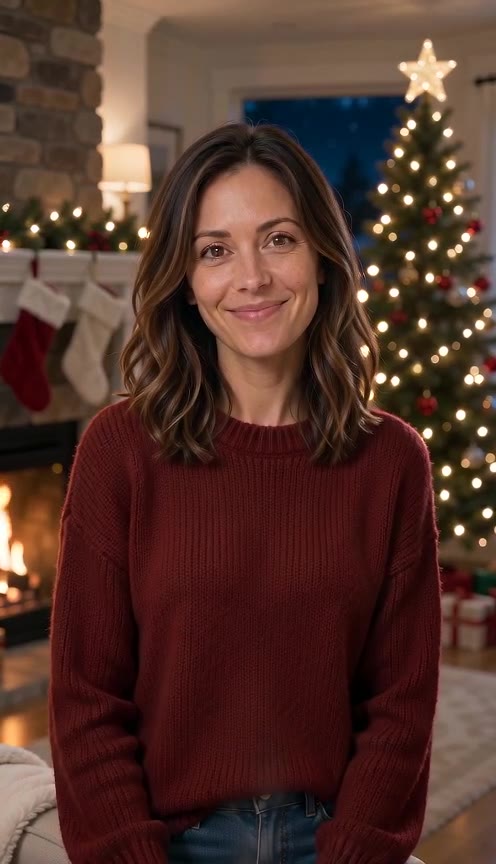
Knit sweater, stone hearth, tree lights behind you. Good for parents, grandparents and anyone who would frame the photo.
Retro glam: the fun one
A red studio backdrop, big hair and a flash-bulb pose straight out of a 1980s mall portrait. Made for friends and the group chat.
Pajama portrait: the cosy one
Matching plaid pajamas by the tree. Works for couples and housemates when the photo shows only adults.
How to turn a Christmas photo into a video
- 1
Choose the photo
A recent photo with your face clearly visible works best: eye level, good light, no sunglasses. A selfie is fine.
- 2
Choose the look
Fireside, Retro glam or Pajama portrait. Add one optional detail, like an outfit colour or a final gesture.
- 3
Render and send
In a few minutes you get an 8-second 9:16 MP4 with music. Download it or share the link; it is also in your Library.
Moving Christmas portraits made here
Rendered on this page from AI-generated sample people.
- Made with AI Greeting Video
Fireside portrait
Made with AI Greeting Video · Seedance 2.0 Mini 480p · 8 s
- Made with AI Greeting Video
Retro glam portrait
Made with AI Greeting Video · Seedance 2.0 Mini 480p · 8 s
- Made with AI Greeting Video
Pajama portrait
Made with AI Greeting Video · Seedance 2.0 Mini 480p · 8 s
Tap a clip to hear it. All examples were made by us from AI-generated people. Your clip is made from your own photo. contact@aigreetingvideo.com
What to write when you send it
The clip does the talking, so keep the message short and personal. A few that work:
For family
“Couldn’t make it home this year, so I sent myself by video. Merry Christmas!”
For friends
“Took my holiday portrait very seriously this year. Happy holidays!”
For clients or coworkers
“Warm wishes for the holidays and a great start to the new year.” Use the Fireside look and keep it tidy.
Want a still photo instead?
If you need a printable card or a profile picture, start with the AI Christmas photo styles: snow globe, Polaroid with Santa, ugly sweater and more. Then come back here to make the same moment move.
Price
| Quality | Length | Credits |
|---|---|---|
| 480p | 8 s | 390 |
| 720p | 8 s | 810 |
Failed renders are refunded. There is no free preview on this page.
Fine-tune your video
Same prompt, full controls: switch the model, length or aspect ratio, attach a reference video, then generate.
Christmas photo to video questions
Can I animate an old Christmas photo?
You can use any photo where an adult’s face is clear. The look you pick replaces the background and outfit, so the result is a new holiday scene with that face.
Can I use a family photo with several people?
Only if everyone in it is an adult who agreed. For the best likeness, use a photo of one or two people.
How long is the video and what format is it?
Eight seconds, vertical 9:16 MP4, with background music.
How much does it cost?
390 credits at 480p or 810 at 720p. Signing up is free (no card) and new accounts get 100 credits, valid for 5 days (one grant per email). They cover images and a short test video: the cheapest clip is 20 credits, and Grok Imagine Video 1.5 makes up to 8 seconds at 480p for 100 credits. Chatting with the agent is free. Longer or higher-resolution videos need a plan or a one-time credit pack. The exact cost shows before every render, and failed renders are refunded.
Is this a ChatGPT or Gemini feature?
No. It runs on AI Greeting Video with the Seedance 2.0 Mini video model; you do not need another account.
Can I make a still Christmas photo too?
Yes, on the AI Christmas photo page, which has ten still styles. This page is for the moving version.
More Christmas greetings
Make this year’s Christmas photo move
One photo, one look, eight seconds.