

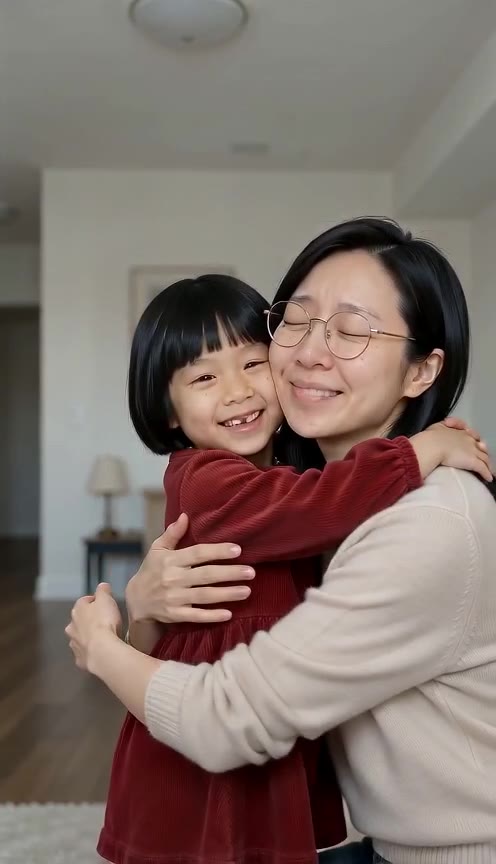
 Made with AI Greeting Video
Hug my younger self: step into your childhood photo
Pick a photo of you now and a photo of you at six or eight. AI turns them into a 10-second vertical video: the old snapshot comes to life, today’s you walks in, kneels down and hugs the kid you used to be. Post it, or send it as a birthday or graduation surprise.
Make your hug-my-younger-self video
Photo 1 is you today, photo 2 is you as a child. Choose where the two of you meet and render. The walk-in, the hug and the final two-shot are already written. Every render uses credits; there is no free preview.
1 · Add you now + you as a kid
2 · Choose where you meet
3 · Choose quality, then render
Photo 1 must be you, an adult. Photo 2 must be your own childhood photo. Do not upload anyone else’s photos, other children or public figures. No free preview: each render uses credits, and a failed render is refunded automatically. See plans
Four places to meet the kid you were
Each scene keeps both faces from your photos and ends on a clear two-shot, so the last frame works as a thumbnail.
Old photo comes alive
The camera pushes into your faded print until it starts to move. You walk in, in today’s colours, and kneel for the hug. The most shared version of the trend.
Childhood bedroom
Golden-hour light, a patterned quilt, toys on the shelf. You come through the door and sit beside your younger self. Quiet and personal.
Park swings
Your younger self jumps off the swing and runs to you, and you catch them in a hug. The happiest of the four.
Graduation day
You in cap and gown, diploma in hand, and the kid who started it all tugs your sleeve. Ends with your cap on their head.
Hug-my-younger-self videos made here
Rendered on this page from AI-generated people at two ages, not real people.
- Made with AI Greeting Video
Old photo comes alive
Made with AI Greeting Video · Seedance 2.0 Mini 480p · 10 s
- Made with AI Greeting Video
Childhood bedroom
Made with AI Greeting Video · Seedance 2.0 Mini 480p · 10 s
- Made with AI Greeting Video
Park swings
Made with AI Greeting Video · Seedance 2.0 Mini 480p · 10 s
- Made with AI Greeting Video
Graduation day
Made with AI Greeting Video · Seedance 2.0 Mini 480p · 10 s
Tap a clip to hear it. All examples were made by us from AI-generated people, not real adults or children. Your clip is made from your own two photos. contact@aigreetingvideo.com
How to make a video hugging your younger self
- 1
Find the childhood photo
Any photo where your face as a kid is clear: a family album print, a school picture or an old digital snapshot. Photograph a print flat in daylight or scan it.
- 2
Add a recent photo of you
A selfie works. Face the camera, good light, no sunglasses. The video keeps your hair, glasses and look from this photo.
- 3
Pick a scene and render
Choose one of the four meetings, add an optional detail, and render. You get a 10-second 9:16 MP4 with soft music in a few minutes, saved to your Library.
Photo tips for a better likeness
The model can only keep what it can see. Two clear faces matter more than anything else.
- One person per photo, face filling a good part of the frame
- Childhood photo between about age 4 and 10, eyes visible
- Old prints photographed flat, without glare or a thumb in the shot
- A recent photo of you in normal light, looking at the camera
Avoid
- Group photos where the child is tiny in the frame
- Baby photos: faces change too much to read as you
- Heavy filters, sunglasses or hats that hide the eyes
- Photos of other people, even with their permission
When a hug-my-younger-self video makes a good gift
On social it is a trend; in a private message it is a small, personal present. A few moments where it lands:
Birthdays
A milestone birthday (30, 40, 50) is the obvious one: the person you are now meeting the kid who could not wait to grow up. Make your own, or help a partner make theirs with their photos.
Graduations
Use the Graduation day scene the week of the ceremony. It says “we made it” without a single word of caption.
Mother’s Day and Father’s Day
Send it to the parent who took the childhood photo. It is a good way to get them telling the story behind it.
Just for you
Plenty of people make one for themselves after a hard year or a big move: a note to the kid you were that things turned out fine.
Price
| Quality | Length | Credits |
|---|---|---|
| 480p | 10 s | 480 |
| 720p | 10 s | 1,010 |
Failed renders are refunded. There is no free preview on this page.
Fine-tune your video
Same prompt, full controls: switch the model, length or aspect ratio, attach a reference video, then generate.
Hug my younger self questions
What is the hug my younger self trend?
A short video where the person you are today meets you as a child and the two of you hug. It spread on TikTok and Instagram once AI video could put both faces in one moving scene.
Which photos do I need?
Two: a recent photo of you (one adult, face clear) and a photo of you as a child, ideally between about 4 and 10 years old. Upload them in that order.
Can I use a photo of someone else, like my partner or my kid?
You can help an adult make their own video with their own two photos and their consent. Do not upload photos of other children or of people who did not agree; the childhood photo must be of the adult in photo 1.
Will it really look like me?
Both faces are read from your photos, so a clear, well-lit face in each gives the closest result. Blurry group shots and baby photos give a weaker likeness. If a render misses, try a different childhood photo before switching scenes.
How long is the video and what format is it?
10 seconds, vertical 9:16 MP4 with soft background music, at 480p or 720p.
How much does it cost?
480 credits at 480p or 1,010 at 720p. Signing up is free (no card) and new accounts get 100 credits, valid for 5 days (one grant per email). They cover images and a short test video: the cheapest clip is 20 credits, and Grok Imagine Video 1.5 makes up to 8 seconds at 480p for 100 credits. Chatting with the agent is free. Longer or higher-resolution videos need a plan or a one-time credit pack. The exact cost shows before every render, and failed renders are refunded.
Do I need TikTok, CapCut or another app?
No. It runs on AI Greeting Video with the Seedance 2.0 Mini video model. Download the MP4 and post it anywhere.
Are my photos kept or shared?
Your photos are used to make your video and are handled as our privacy policy describes. The examples on this page are made from AI-generated people, never from visitors’ uploads.