

 Made with AI Greeting Video
Santa caught on camera, in your own living room
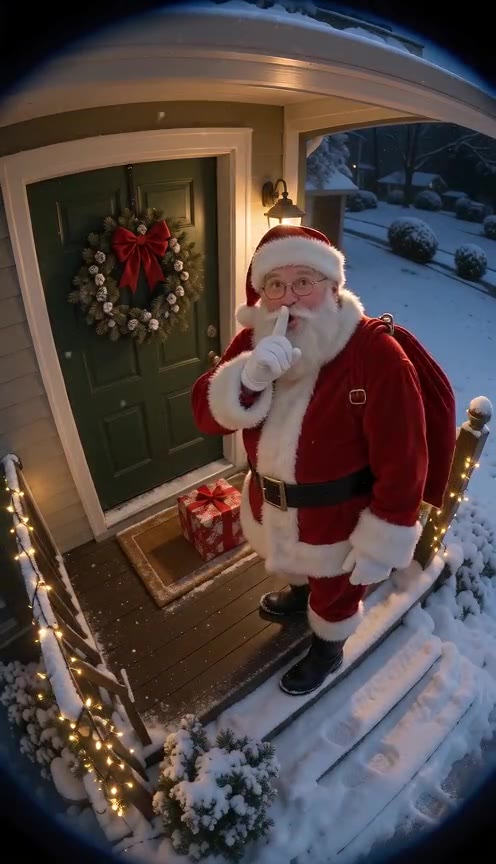
Take a photo of the tree, the fireplace or the front door from where a camera would hang. AI adds Santa to that exact room: he tiptoes in, sets down a gift, notices he is being filmed and hushes the lens. Eight seconds of security-camera footage to play on Christmas morning.
Put Santa on your camera
51 days leftOne photo of an empty room or porch, one Santa moment, then render. The camera look, Santa and the timing are in the prompt already.
1 · Upload your room or porch
2 · Choose what Santa does
3 · Choose quality, then render
Upload your own home only, empty of people, and never a child. What you get is generated footage rather than a real recording, so tag it as AI when sharing. We have no tie to any camera maker. No free preview: each render uses credits, and a failed render is refunded automatically. See plans
Santa camera clips made here
Rendered on this page from AI-generated home photos.
- Made with AI Greeting Video
Gift at the front door
via AI Greeting Video · Seedance 2.0 Mini 480p · 8.1 s
- Made with AI Greeting Video
Presents under the tree
via AI Greeting Video · Seedance 2.0 Mini 480p · 8.1 s
- Example
Viral TikTok: Santa hushes a doorbell cam
via @bobby_jackson0 · 10.6M views (Oct 30)
- Example
TikTok: night-vision Santa on the front path
via @frontdoorsanta · 306K views (Oct 30)
Tap a clip to hear it. Our own clips were made from AI-generated home photos. The TikTok clips belong to their creators, are credited and linked, and come down on request. contact@aigreetingvideo.com
How families use it on Christmas morning
Render the clip the night before. In the morning, open it on the TV or a phone and say the camera picked something up overnight. The presents in the clip do not have to match the real ones; the shushing Santa is the moment people remember.
Send it to the grandparents
Grandparents who are not there in the morning still get the moment: send the MP4 in the family chat with “Look who came by last night.”
Pair it with a message from Santa
Follow up with an AI Santa video that says the child’s name, so the visit has a voice too. No child photo is needed for either one.
Pick Santa’s moment
Gift at the front door
For a porch or doorbell view. Santa sets a present down and shushes the lens.
Presents under the tree
For the living room. Santa kneels by the tree, then hears something.
Caught eating cookies
Leave a plate in the photo. Santa takes a bite and gives a thumbs-up.
Night cam
Black-and-white infrared, the classic “caught at 2 a.m.” look.
How to make a Santa caught on camera video
- 1
Photograph the spot
Stand on a chair or hold the phone high, angle it down at the door or the tree, and take the photo with nobody in it. Landscape or portrait both work.
- 2
Choose the moment
Front door, tree, cookies or night cam. Add a detail if you like, such as falling snow.
- 3
Render and keep it for the morning
The 8-second clip lands in your Library in a few minutes. Download the MP4 to play it offline.
Room photos that work
- Taken from above, like a wall camera
- The door, tree or fireplace fully in frame
- Lights on, no motion blur
Avoid
- People, children or pets in the shot
- Very dark or very close-up photos
- Screenshots with timestamps or app overlays
Price
| Model | Quality | Credits (8 s) |
|---|---|---|
| Seedance 2.0 Mini | 480p | 390 |
| Seedance 2.0 Mini | 720p | 810 |
| Grok Imagine 1.5 | 480p | 100 |
Failed renders are refunded. No free preview on this page.
Fine-tune your video
Same prompt, full controls: switch the model, length or aspect ratio, attach a reference video, then generate.
Santa camera video questions
Does it use my real security camera?
No. You upload one still photo of the room and the AI films a short clip in that room. Nothing connects to your camera or doorbell.
Should the children appear in my photo?
No. Shoot the room while it is empty; the only figure who appears in the finished video is Santa himself.
How long is it and what does it cost?
Each clip runs 8 s. Budget 100 credits on Grok Imagine 1.5, or 390 on Seedance 2.0 Mini 480p for a closer match to your room. Signing up is free (no card) and new accounts get 100 credits, valid for 5 days (one grant per email). They cover images and a short test video: the cheapest clip is 20 credits, and Grok Imagine Video 1.5 makes up to 8 seconds at 480p for 100 credits. Chatting with the agent is free. Longer or higher-resolution videos need a plan or a one-time credit pack. The exact cost shows before every render, and failed renders are refunded.
Can Santa say my child’s name in it?
This clip is silent footage, so no. If you want him to greet your child by name, head to the named Santa message instead.
Is it OK to post it online?
Yes, but label it as AI-made. It is a fun Christmas clip, not real footage.
More from Santa
Let the camera catch Santa this year
One photo of your room, eight seconds, ready by morning.